 ChatTiger
Comment and get it by DM
Write “Comment PRICE and I’ll send you our prices” on your post. When someone does, ChatTiger replies to them publicly and sends them the info by DM, in seconds, at any hour.
How it works
We call this a rule (in the dashboard it’s an automation). If the person replies to the DM, your AI agent takes the conversation from there.
Before you start
Comments that come in while there’s no rule yet don’t get a reply later. For a new post, use My next post: you set it up before posting and it replies from the very first comment.
Pick a word people won’t type by accident: PRICE, GUIDE, DETOX. In All my posts rules, skip words like yes, hi or info: they’d reply to comments that aren’t meant for that, on every post. The dashboard warns you if you use one of them.
Create the rule
-
Open “Automations”
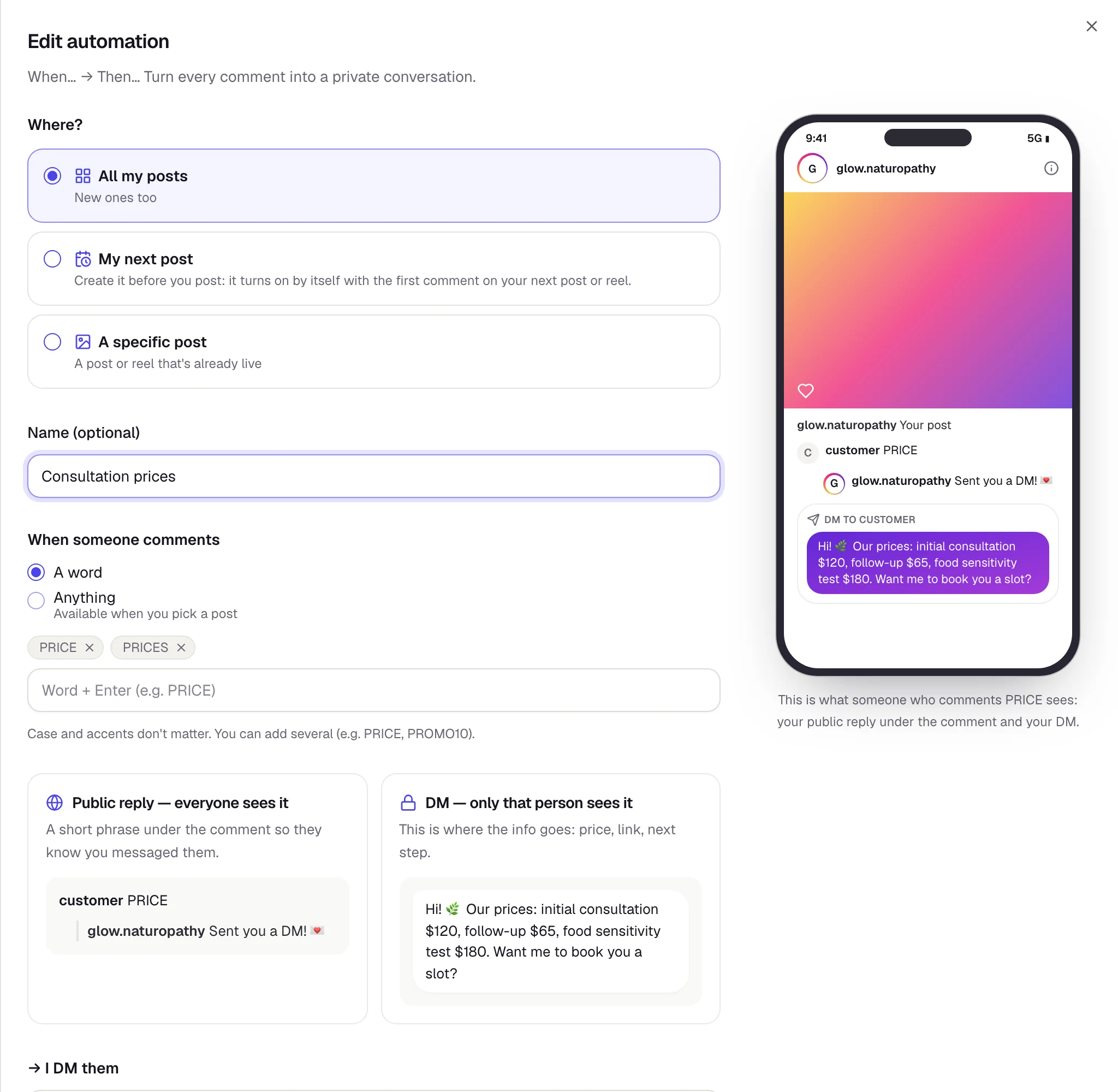
In the menu on the left, tap Automations (on your phone, Rules). If you have several agents, first pick your Instagram agent in the selector at the top. On the Comments tab (it opens first), tap New automation. On a computer, next to the form you’ll see a phone showing what the commenter will get. It updates as you type.
 1
2
- 1The form: where it works, the word and the messages.
- 2What the commenter will see. It updates as you type.
-
Choose where it works
 1
2
3
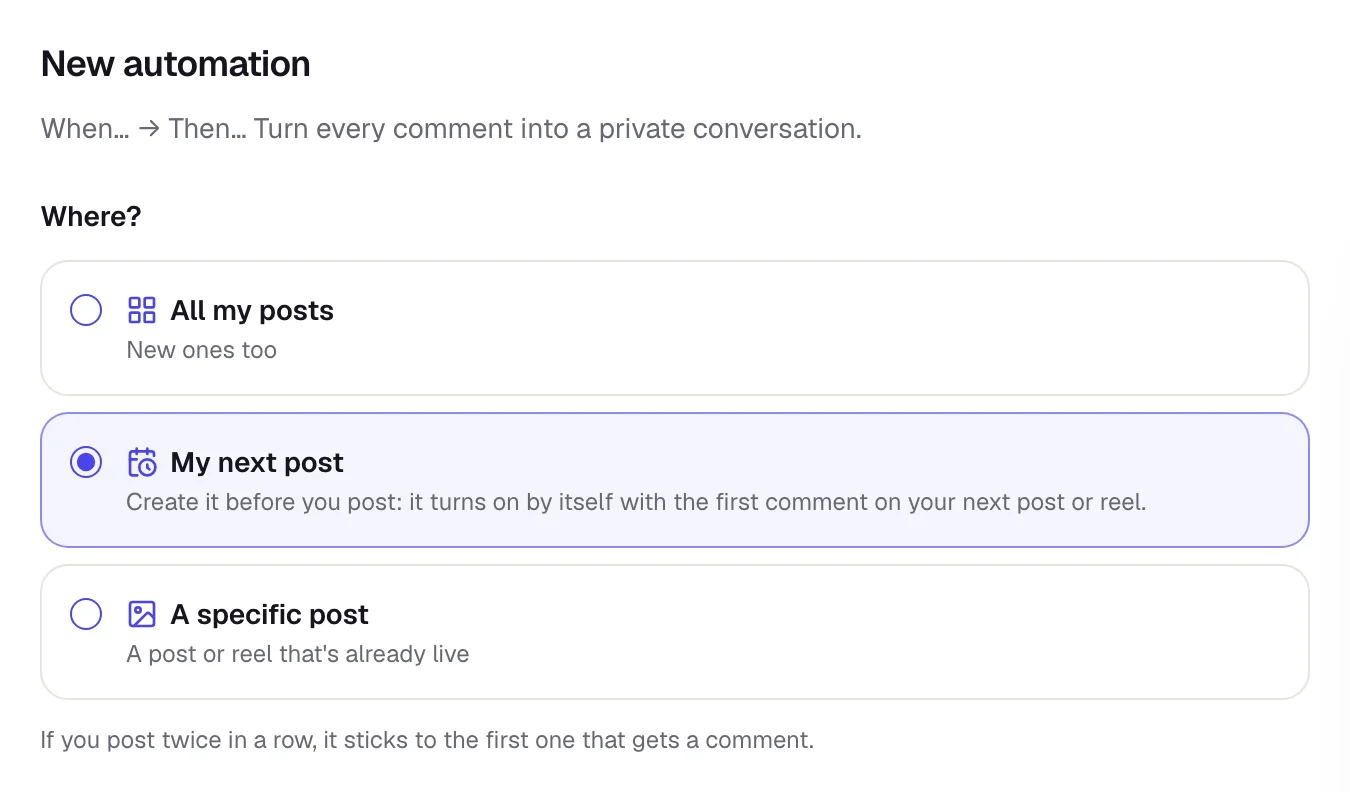
- 1All my posts: works on everything you’ve already posted and everything you post later.
- 2My next post: for a post or reel you haven’t posted yet. Create it before you post, and it turns on by itself with the first comment.
- 3A specific post: a post or reel that’s already live.
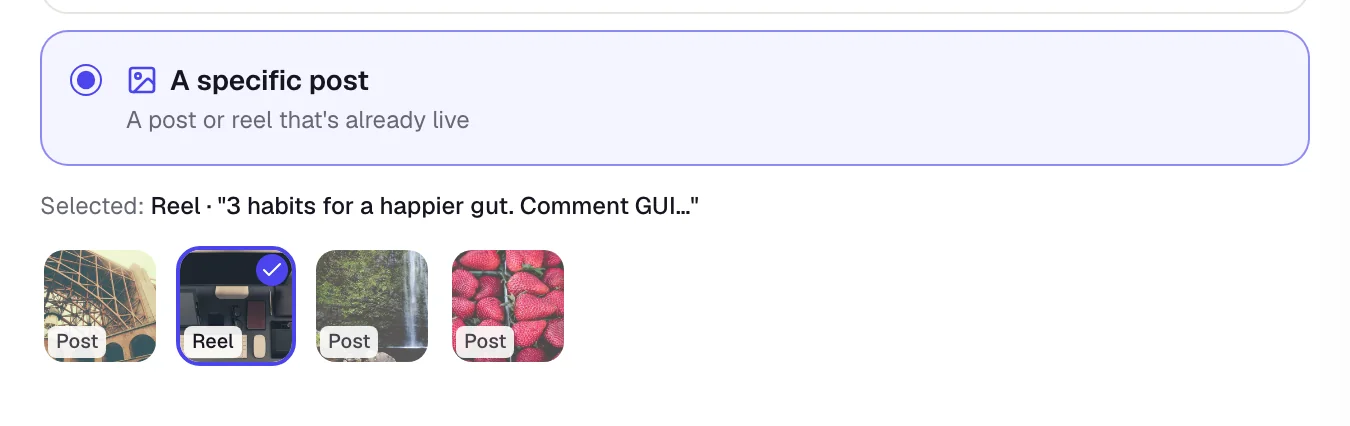
If you choose A specific post, you’ll see your recent posts. Tap the one you want.
-
Type the keyword
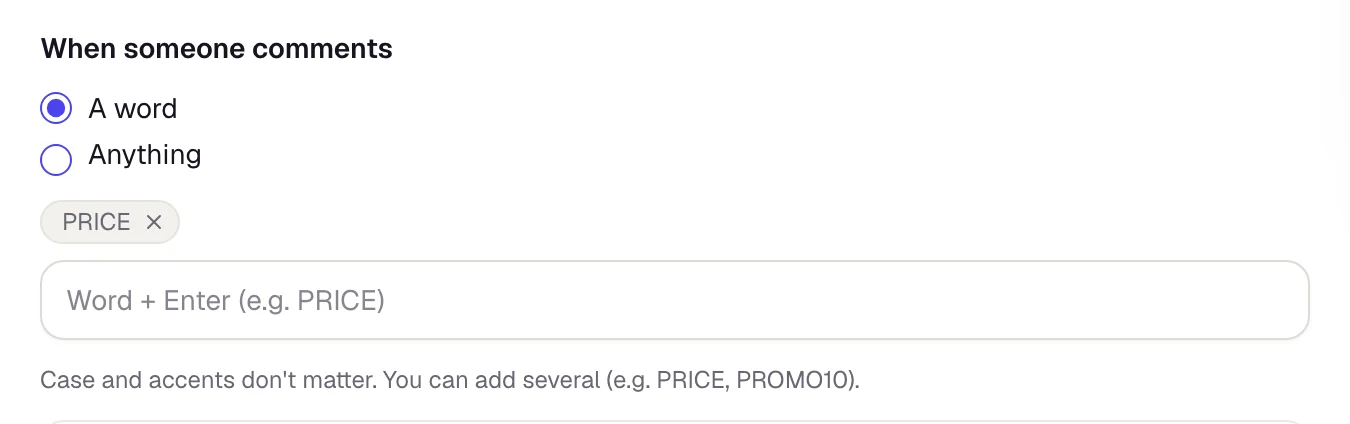
Give it a name you’ll recognize (for example Consultation prices). Under When someone comments, leave A word selected, type your word and press Enter.
 1
2
- 1A word: it only replies to people who comment that word.
- 2Your word. Capitalization doesn’t matter: price, Price and PRICE all work.
It looks for the whole word: if your word is PRICE, the comment “What’s the price?” works, but “PRICES” doesn’t. That’s why you can add up to 10 words to the same rule, for example PRICE and PRICES.
-
Write the public reply and the DM
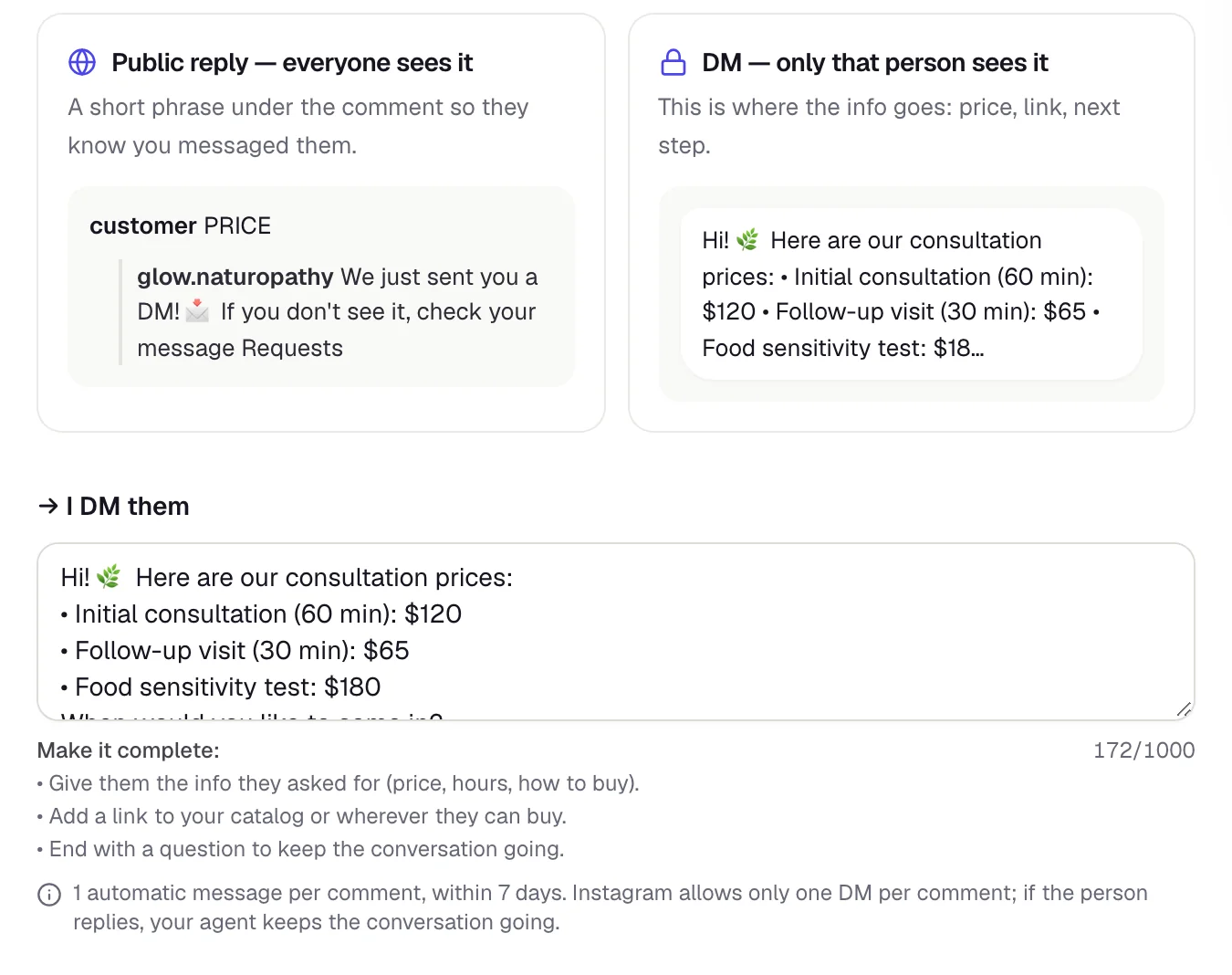 1
2
3
- 1Public reply: a short line under the comment. Everyone sees it.
- 2DM: what the person will see in their inbox.
- 3This is where you write the DM. Give them what they asked for, add how to book or buy, and end with a question.
Further down are the public replies: you need 3 to 5 different lines, and they take turns. That way Instagram doesn’t see the same text over and over, which can get your account limited. Don’t put links or @mentions in them. The Get more with AI button helps you write them.
-
Optional: button and “Require a follow”

- Send with a button: first they get a card with a button, and when they tap it, they get your message.
- Require a follow: when they tap the button, we check if they follow you. If they don’t, we ask them to follow you and tap “I’m following you”.
Buttons only show up in the Instagram appOn Instagram on a computer or in a phone’s browser, the card shows up without the button. If a lot of your customers use Instagram on the web, leave these options off so the DM arrives right away.
-
Save it and check that it’s “On”
Tap Save automation. Your rule shows up in the list, grouped by where it works, with the On switch turned on.
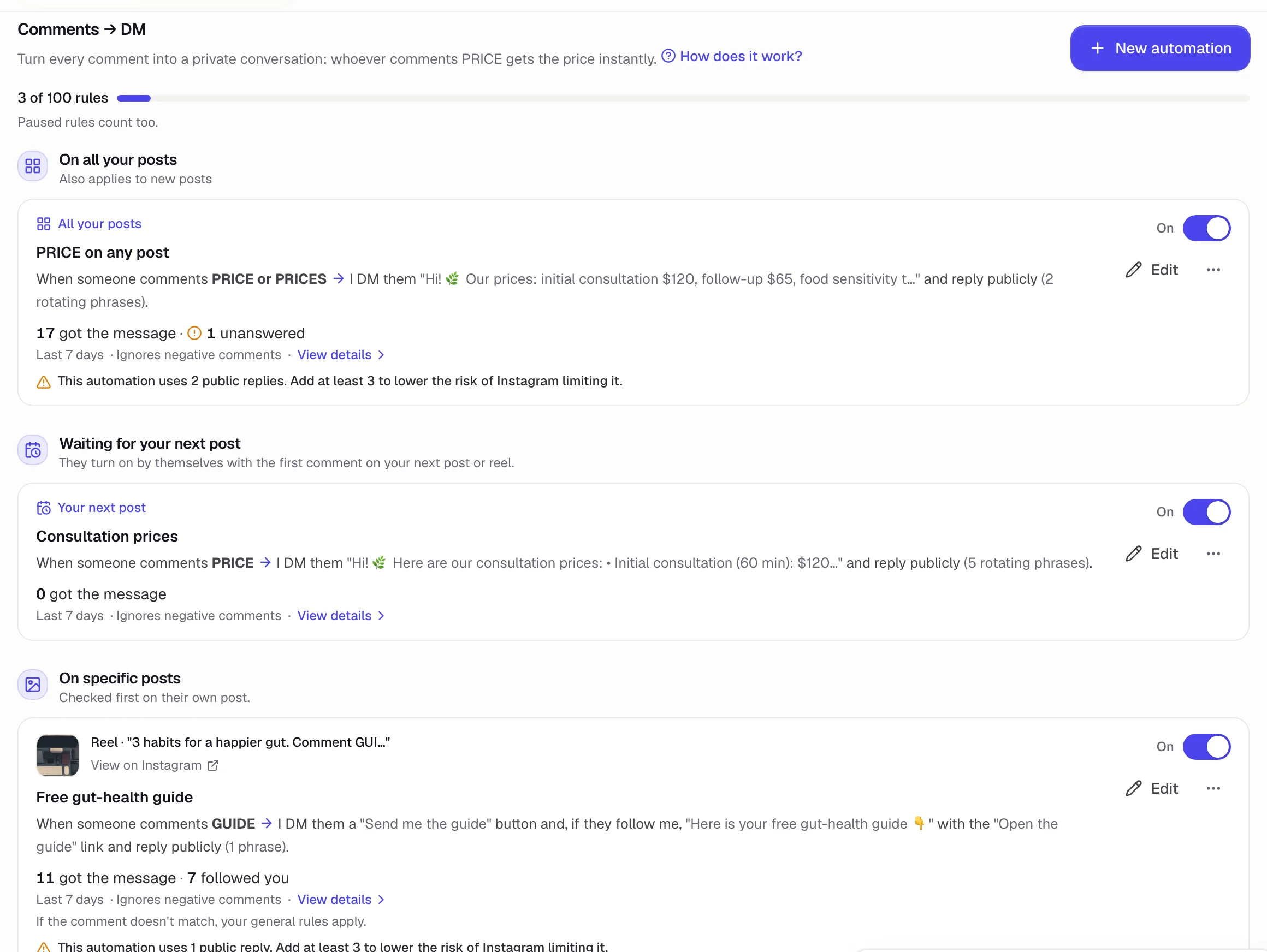 1
2
3
4
- 1How many of your 100 rules you’ve used. Paused rules count too.
- 2Waiting for your next post: rules ready for your next post.
- 3On specific posts: each rule with its post. These are checked before the general ones.
- 4On turns the rule on or pauses it without deleting it. Next to it is Edit, and in the ⋯ menu you can Duplicate the rule (for another post, say) or Delete it (it asks you to confirm).
Read the summary on each rule (“When someone comments PRICE → I DM them…”) to make sure it says what you want. Once you have lots of rules, filters by type show up at the top (from 6 rules) and a search box (from 10).
Launch a new post with “My next post”
-
Create the rule before you post
Under Where?, choose My next post, add your word (for example PRICE) and save. It goes into the Waiting for your next post group.
-
Publish your post or reel
Write “Comment PRICE and I’ll send you our prices” in the caption. With the first comment, the rule locks onto that post, and that same comment already gets its DM. From then on you’ll find it under On specific posts, with the post’s photo.
-
One launch at a time
If you publish two posts back to back, the rule locks onto whichever gets a comment first. Publish one, wait for its first comment, then post the next.
Once a rule locks onto a post, it stays with that post. For your next launch, create a new rule with My next post. Posts that already existed before you created the rule never trigger it.
Test it before you announce it
Rules only work when your agent is on. In Draft or Paused, it doesn’t send anything. In Test mode, it only replies to your test accounts. When it’s Live, it replies to everyone.
- From another Instagram account (not your business one), comment your word on a post.
- Check that the public reply shows up under the comment.
- Look for the DM in that account. The first one usually lands in Requests, not in the main inbox.
- If you use a button or “follow me”, test it in the Instagram app on your phone.
If the same account comments again on the same post within the next 30 days, they don’t get anything new. To test again, use another post or another account.
If they say “I didn’t get it”
They almost always did. When someone doesn’t follow you and has never messaged you, Instagram puts your DM in their message Requests (sometimes in Hidden requests) and doesn’t notify them. That’s why they don’t see it.
- Use public replies that say so, for example “We just sent you a DM! 📩 If you don’t see it, check your message Requests”. New rules already come set up this way.
- Pin a comment on your post. In the dashboard, when you create or edit the rule, there’s one ready to go with the Copy comment button:
📩 Commented PRICE and don’t see my message? It did go through: if you don’t follow me, Instagram keeps it in your message Requests (or in Hidden requests). Go to your DMs → Requests, accept it and there it is 🙌 Haven’t commented yet? Comment PRICE here or on the post.
For people who already commented and said nothing, reply under their comment (publicly, not by DM: another DM would land in Requests too):
Your message is there! 🙌 Since we don’t follow each other yet, Instagram put it in your message Requests. Go to your DMs → Requests, accept it and you’ll find it 📩
Each person gets the message only once per post, so a second comment gets nothing. The first one already reached them: they just need to look in Requests.
Limits to know
Each comment triggers only one rule: the rules for that post are checked first, then the All my posts ones. Anything (reply to every comment) only exists in rules for one post, not in All my posts rules. If someone writes the word as a reply inside another comment (for example, the one you pinned), they get the DM but no public reply, and Anything doesn’t trigger on those replies. If you turn on Ignore negative comments, complaints and insults are left for you to handle.
Common mistakes
I posted and nobody got the message
The most common reason: the rule was created after you posted. Earlier comments don’t get a reply later, so answer them yourself from Instagram. Next time, create the rule first with My next post. Also check that your agent isn’t in Draft, Test mode or Paused, that the rule is On, and that the word matches the one in your post.
My rule is still in “Waiting for your next post”
Nobody has commented yet on a post published after you created the rule. Posts that already existed don’t trigger it. As soon as the first comment comes in on your new post, the rule locks onto it.
The rule locked onto the wrong post
You published two posts back to back and the other one got the first comment. Edit the rule and, under Where?, pick the right post with A specific post.
They got “Tap the button” but don’t see any button
They’re using Instagram on the web. Buttons only show up in the phone app. Turn off Send with a button if you want the message to reach everyone directly.
Someone got a message they didn’t ask for
The word is too common, or two rules use it. Switch to a word that’s unique to that campaign.
People tell me they didn’t get the message
It’s in their message Requests: Instagram puts the first message from an account they don’t follow there. See If they say “I didn’t get it”.
They commented the word and we didn’t reply
Check two things. If they’d already commented on that post before, they got their message the first time. And if their comment doesn’t show on your post, Instagram may have hidden it: look for it in the post’s Hidden comments.
Nobody gets the message and the dashboard shows sending errors
Check that Allow access to messages is turned on in Instagram. Without it, Instagram doesn’t deliver your agent’s messages. When that’s the problem, the rule’s details show it under Waiting on you, ask you to check that setting and walk you through the steps. How to turn it on.
When your prices change
A rule for a post keeps replying as long as that post gets comments. If your prices or info change, edit the message or tap On to pause it.